Keychron Q Series vs. K Pro Series: Which Is the Ultimate Typing Upgrade?
Choosing Your Path to the Perfect Mechanical Keyboard
The Enthusiast’s Dilemma: Better or Just Different?
Ever feel like your current keyboard is just a tool, while you’re looking for an instrument? Watching your fingers bounce off stiff, plastic keys can be a massive bottleneck to the “flow state” we all crave during long coding or writing sessions. You know Keychron is the go-to brand, but the price gap between their lineups is confusing—is an all-metal chassis actually worth double the price of a wireless workhorse?
The Short Answer:
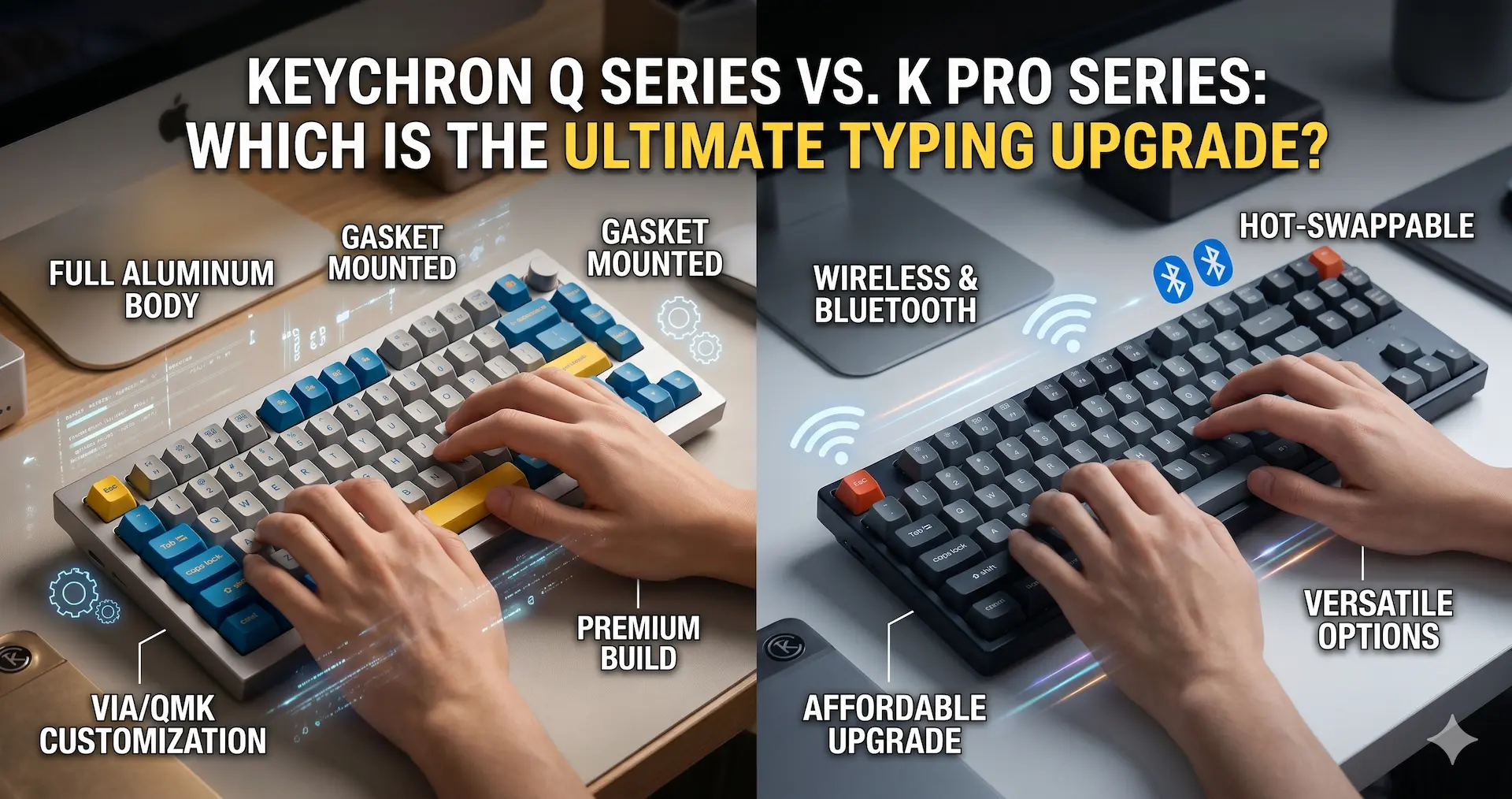
When comparing the Keychron Q Series vs. K Pro Series, the choice comes down to build philosophy vs. versatility. The Q Series is a premium, heavy-duty “enthusiast” line featuring a full CNC aluminum body and a gasket-mount design for a softer, more cushioned typing feel. The K Pro Series is a mid-range “prosumer” line that offers a lighter, more portable build with Bluetooth connectivity and a standard tray-mount design. While both support QMK/VIA programming, the Q Series offers a more “thocky,” refined acoustic experience, whereas the K Pro is the better choice for multi-device wireless workflows.
Build Quality: All-Metal Tank vs. Wireless Versatility
The most immediate difference you’ll feel is the weight. The Q Series isn’t just a keyboard; it’s a desk anchor.
The Q Series: The CNC Aluminum Heavyweight
The Q Series is built from solid CNC machined aluminum. This isn’t just about aesthetics; the mass (often weighing 5 lbs or more) eliminates case vibration and provides a “tight,” premium sound.
- Wired-Only (Standard): Most Q models are wired to ensure zero latency and a pure custom experience, though “Pro” and “Max” variants have since added wireless.
- Acoustic Tuning: They come pre-loaded with sound-dampening foam and silicone gaskets to kill the “metallic ping” found in cheaper boards.
The K Pro Series: The Hybrid Contender
The K Pro Series uses a plastic body, often reinforced with a detachable aluminum frame for structural rigidity.
- Portability: These are significantly lighter, making them ideal if you swap between a home office and a coffee shop.
- Bluetooth Connectivity: Unlike the base Q series, every K Pro is designed for wireless use, supporting up to 3 devices simultaneously.
The Typing Experience: Gasket Mount vs. Tray Mount
If you want to know why enthusiasts pay a premium, it’s all in the “mount.” This refers to how the internal plate is attached to the case.
Gasket Mount (Q Series)
The Q Series uses a double-gasket design. The plate is suspended between pieces of foam or silicone, allowing the entire typing surface to flex slightly when you press a key.
- Feel: It provides a “bouncy” and soft impact that reduces finger fatigue during 8-hour workdays.
- Sound: It produces a deeper, more consistent “thock” because the plate isn’t vibrating directly against the case.
Tray Mount (K Pro Series)
The K Pro Series generally uses a tray-mount system, where the PCB/plate is screwed directly into the bottom of the case.
- Feel: This creates a firmer, more rigid typing experience. Some users prefer this “stiff” feedback for gaming, but it can feel harsher during long typing sessions.
- Consistency: Because the screws are at fixed points, some keys (like the “G” and “H”) may sound and feel different than those at the edges.
Customization and Software: QMK/VIA Support
The “Pro” in K Pro and the “Q” in Q Series both signify that these keyboards are fully programmable.
- VIA Compatibility: You can remap any key or create complex macros using a web browser—no bloatware required.
- Hot-Swappable: Both series allow you to pull out the switches and replace them without soldering, making it easy to test different tactile or linear feels.
- South-Facing RGB: Both lines typically feature south-facing LEDs, which are better for high-quality PBT keycap compatibility (no “interference” with Cherry profile caps).
The Verdict: Which Keychron Is for You?
Buy the Keychron Q Series if:
- You want the absolute best typing feel and sound (Gasket Mount).
- You don’t need to move your keyboard and prefer a heavy, premium desk setup.
- You plan on modding your keyboard with different plates (FR4, Polycarbonate) and foams.
Buy the Keychron K Pro Series if:
- You need wireless Bluetooth connectivity for multiple devices.
- You are on a stricter budget but still want 90% of the custom keyboard experience.
- You prefer a standard, firm typing feel and a lighter, portable chassis.
Are you ready to move from a mushy office board to a custom masterpiece? Which factor matters more to you: the “bouncy” feel of a gasket mount or the freedom of wireless?